Last updated:
Disclosure: As an Amazon Associate we earn from qualifying purchases. This does not change what we recommend. See our affiliate disclaimer.
A small office, whether at home or in a shared building, needs an air purifier that is quiet enough for calls, compact enough for a crowded floor and effective on dust, allergens and some odors. The best choice has a true HEPA filter, a CADR suited to the room and a low-speed mode that does not distract. Because many offices are closed rooms with printers, carpets and long hours at the desk, steady filtration and regular ventilation make a difference.
We have not tested these products ourselves, so check manufacturer specifications. Nothing here is medical advice. Ask your employer about policies before using devices at work.
What matters
- Quiet low speed
- True HEPA filtration
- Compact footprint and easy filter swaps
What to avoid
- Ozone or ionizer devices
- Loud fans near your microphone
- Units too big for the room
Key Takeaways
- Choose a quiet true HEPA unit sized for the room
- Place it away from your microphone
- Ventilate; purifiers do not lower CO2
- Check workplace policy first
A Day in the Life: Using a Purifier at Your Desk
Switch the unit on when you arrive and leave it on low while you work. Check the pre-filter weekly and wipe the intake with a dry cloth. If you print a lot, open a window or door for a few minutes after large jobs. Use a damp cloth on your desk, keyboard and screen to reduce dust. If you have allergies, keep tissues, medication and water nearby and take short breaks outdoors. At the end of the day, leave the unit running or turn it off based on your preference and noise needs. After a few weeks, note whether your symptoms, stuffiness or dust levels have changed and adjust speed or placement. Small habits keep the unit effective without fuss.
Sizing Examples for Typical Small Offices
A 100 square foot office suits a unit with a CADR around 65 or more, while a 150 square foot office benefits from around 100. These are rough guides for eight-foot ceilings. Check the manufacturer’s recommended room size and consider going up one size if you have pets, carpets or heavy dust.
Noise Levels in Context
A quiet fan is similar to a soft background hum. Choose a unit whose lowest speed is barely noticeable and test at different speeds. Place it on the floor or a stable surface to reduce vibration.
Odors, Cooking and Shared Kitchens
Shared kitchens and food odors can drift into offices. Carbon filters can reduce some smells. Keep doors closed and ventilate.
Wildfire Smoke and Outdoor Air Alerts
On smoky days, keep windows closed, run the purifier at a higher speed and check building ventilation settings.
Maintenance Calendar
Weekly: check the pre-filter. Monthly: wipe the unit and vacuum the intake. Every few months: replace the main filter as recommended.
Cost Planning
Add the price of replacement filters to the purchase price to compare long-term cost. Choose a model with accessible filters and a warranty.
Compact Versus Tower Designs for Offices
Compact cube or cylinder units fit on a desk or shelf and suit tiny offices, but their airflow is limited. Tower units fit beside a desk and usually offer higher CADR for small rooms. Consider where cables run, whether the unit blocks a walkway and how easily you can reach the filter door. In shared offices, a neutral design with a dimmable display is less distracting. Check weight if you plan to move it between rooms, and confirm that the intake is not blocked by walls or furniture. If your office is under 100 square feet, a compact unit may be enough, while larger or open rooms need a stronger model. Always confirm room size ratings on the product page.
What to Ask Building Management
Ask about HVAC filter type and change schedule, ventilation rates and recent leaks or mold. Ask whether portable purifiers are allowed and whether there are rules on electrical devices. A short, polite message with specific questions usually gets a clear answer and sometimes leads to improvements for everyone.
Dust, Paper and Printer Particles
Paper dust, toner particles and cleaning product residue add to office air. Use damp cloths, vacuum with a HEPA vacuum and place printers away from seating. Store paper in closed cabinets when possible.
Signs Your Office Air Needs Attention
Persistent stuffiness, musty smells, visible dust, condensation or recurring symptoms that improve when you leave are signs to investigate. Report leaks and mold, ventilate and keep your area clean.
Choosing Between Two Small Units and One Larger One
If your office is split into zones or has a partition, two compact units can be more effective than one larger unit placed in a corner. Place one near the desk and another near the entrance or printer. If the room is a single open space, one correctly sized unit is simpler and quieter. Consider noise, cost and cords. Keep a spare filter for each model and note replacement dates in your calendar. Review your setup after a few weeks and adjust placement based on how it feels and sounds.
Quiet Air Purifiers for Small Rooms
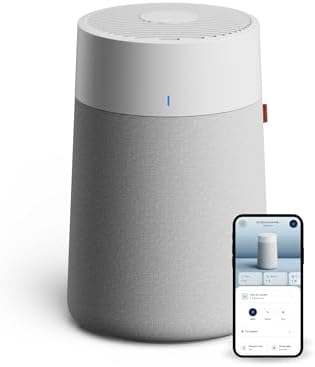
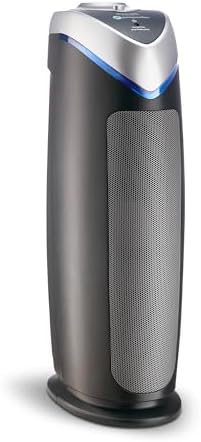
These picks come from the Hostinger affiliate plugin. Specs change by model year, so confirm filter type, CADR, noise and replacement filter costs on the product page before you buy.




How to Choose for a Small Office
Measure the floor area and choose a CADR of about two thirds of it for eight-foot ceilings. Prioritize noise at low speed, filter costs and ease of replacement. Look for a clean design that fits under or beside a desk.
Noise and Calls
Fan noise can be picked up by microphones. Choose a unit with a very quiet low speed and place it away from your microphone. A sleep or quiet mode helps. Test with a recording if you can.
Filters and Maintenance
True HEPA captures 99.97 percent of particles at 0.3 micrometers. A washable pre-filter catches hair and dust. Carbon helps with odors but needs replacing. Keep spare filters and note the replacement date.
Placement
Place the unit a few feet from your seat with clearance on all sides. Do not block the intake with files or cables. Avoid placing it where it can be kicked or tripped over.
Ventilation Still Matters
A purifier does not reduce CO2. Open windows when outdoor air is clean, use exhaust fans and take breaks outdoors. Ventilate printer areas.
Home Office Versus Shared Office
At home you control the unit and placement. In shared offices, agree on noise, placement and filter care and check policy and electrical safety rules.
Printers, Carpets and Dust
Ventilate printers, vacuum with a sealed HEPA vacuum and damp-dust surfaces. Report leaks or musty smells to building management.
Allergies and Asthma at Work
Keep medication at hand, talk to your clinician and consider requesting adjustments. Use a purifier as one part of a plan.
Energy, Costs and Filters
Small units use little power on low. Compare filter prices and replacement intervals and keep a spare filter.
Display Lights and Distractions
Choose a unit with a dimmable display and quiet alerts so it does not distract during work.
How to Choose
- Quiet low speed
- True HEPA filtration
- Compact footprint
- Easy filter replacement
Do
- Match the unit’s rated coverage to your room first
- Run it consistently, not only when the air feels bad
- Leave space around the unit for airflow
- Replace filters on the maker’s schedule
Don’t
- Do not buy on looks or price alone
- Do not block the intake or exhaust
- Do not skip filter changes
- Do not expect a purifier to fix every source of pollution
Honest Limits
- This guide uses manufacturer information and public guidance from the EPA and AHAM, not our own lab tests.
- Features and room ratings change between model years, so confirm on the listing before you buy.
- A purifier is not a medical device and does not replace medical advice or treatment.
Who Should Skip This
When to See a Professional
Frequently Asked Questions
What CADR do I need?
About two thirds of floor area.
Will it be too loud?
Choose a quiet low speed.
Do purifiers reduce CO2?
No.
Can I use one at work?
Check policy.
Bottom Line
For a small office, choose a compact true HEPA purifier with a quiet low speed and a CADR suited to the room, place it with clearance away from your microphone and ventilate regularly. Check workplace policy before bringing a device.
Related reading: sens,fan,bed
Sources: EPA, Guide to Air Cleaners in the Home; AHAM Verifide.