Last updated:
Disclosure: As an Amazon Associate we earn from qualifying purchases. This does not change what we recommend. See our affiliate disclaimer.
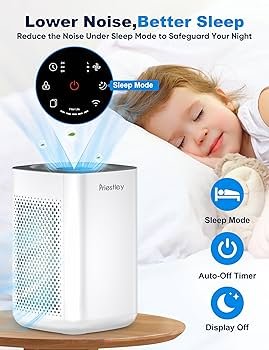
Air purifier noise comes from the fan, airflow through filters and vibration. You can often make a unit quieter by running it on a lower speed for longer, placing it on a stable hard surface with clearance, keeping filters clean and choosing a unit sized for the room so it does not have to run on high. If noise is unusual, such as rattling, scraping or buzzing, check for loose parts or blockages. If you are shopping, look for published noise levels at low speeds and a sleep mode.
We have not tested these products ourselves, so check specifications. Nothing here is medical advice.
Quieter habits
- Use a lower speed continuously
- Keep filters clean
- Place on a stable hard surface
Common noise causes
- Clogged filters
- Loose parts or vibration
- Undersized unit on high speed
Key Takeaways
- Use low speeds and sleep mode
- Keep filters clean
- Place on a stable, hard surface
- Choose a unit sized for the room
A Quiet-Room Setup You Can Copy
Start by choosing a spot a few feet from the bed or desk and place the unit on a hard, level surface such as the floor or a sturdy stand. Make sure there is at least a foot of space around it. Set the speed to the lowest level that keeps the indicator in the good range, and use sleep mode at night. Turn off beeps and dim lights. Clean the pre-filter monthly and replace main filters on schedule. Check the unit after moving it and listen for rattles. If the room is large, consider whether the unit is big enough. Review the setup after a week and adjust placement or speed. Keep notes so you can return to the best configuration.
Noise and Sleep
Constant, low steady sound is usually easier to ignore than changing noise. Avoid auto modes that surge at night unless you can set a quiet limit.
Quiet Models: What to Look For
Look for published decibel levels at low speeds, brushless motors where stated, large fans that move air slowly and dimmable displays. Check reviews for sound complaints.
Noise From Other Sources
Sometimes the noise is not the unit. Check for vibrating furniture, loose windows and other appliances.
Maintenance Tips
Vacuum around the unit, wipe the intake and keep spare filters.
When Noise Signals a Problem
Grinding, burning smells and loud buzzing are warning signs. Stop using the unit and contact support.
Balancing Quiet and Performance
Do not sacrifice performance entirely for silence. Choose a size that lets the unit run on low and check air quality indicators.
How Noise Ratings Are Measured and Why They Differ
Manufacturers measure noise in decibels at a set distance, often with the unit on its lowest or highest speed. Because the speed, distance and room conditions vary, numbers are not always comparable between brands. A reading of around 20 to 30 decibels at low speed is typically very quiet, while higher speeds can reach the 50s or beyond. When comparing, check the speed used for the rating, whether it is measured in a lab and how far the microphone was from the unit. Look for models that give ratings at multiple speeds so you can see what you will hear in your room. Remember that room acoustics, hard floors and echo can make the same unit sound louder or softer.
Choosing a Larger Unit to Run Quieter
A unit with a higher CADR can clean the same room on a lower speed than a small unit running hard. This often means less noise and better results. Check the manufacturer’s recommended room size and consider going up one size if noise matters. Larger units may cost more and need more space, but they can be quieter in daily use. Balance size, noise and filter cost for your situation.
Quick Fixes for Sudden Noise
If the unit suddenly gets louder, check the filter seating, unblock the intake, vacuum around the unit and look for objects touching the fan area. Reposition the unit on a hard, level surface. If the sound is grinding, buzzing or comes with heat, stop using it and contact the manufacturer.
Combining Quiet Habits
Combine low speeds, regular cleaning, good placement and sensible sizing. Small changes add up and make it easier to run the unit continuously, which is what helps air quality the most.
Making Peace With a Little Noise
Every purifier makes some sound because it moves air. The goal is a sound that fades into the background. After a few days at a steady low speed, many people stop noticing it. If you are very sensitive, try placing the unit farther from the bed, using a larger unit at lower speed or choosing a model known for quiet operation. Give yourself time to adapt before deciding to replace it, and compare noise in your actual room rather than only in specifications.
Quiet Air Purifiers for Bedrooms
If troubleshooting does not solve the problem, you may prefer to replace the unit. These picks come from the Hostinger affiliate plugin. Specs change by model year, so confirm filter type, CADR, noise and replacement filter costs on the product page.






Use Lower Speeds and Sleep Mode
Fan noise rises quickly with speed. Running a unit on a low speed for longer cleans effectively and quietly. Use sleep mode, which often lowers speed and dims lights.
Keep Filters Clean
A clogged pre-filter or HEPA filter makes the fan work harder and louder. Clean pre-filters monthly and replace filters on schedule.
Placement and Surfaces
Place the unit on a hard, level surface with clearance on all sides. Soft surfaces and tight spaces amplify noise. Move the unit away from walls and furniture that rattle.
Choose the Right Size
An undersized unit has to run on high to keep up. Choose a CADR suited to the room so it can run on low.
Check for Vibration and Loose Parts
Reseat filters and covers, tighten what the manual allows and look for objects near the fan. Stop using the unit if you hear grinding or smell burning.
Noise in Bedrooms
Place the unit a few feet from the bed, use sleep mode and turn off beeps and bright lights. Consider a larger unit running on low.
Understanding Noise Ratings
Decibel ratings vary by speed and test method. Look for ratings at the speeds you will use and compare like with like.
White Noise and Masking
Some people like steady sound. Others prefer silence. Choose based on your preference and avoid adding extra noise sources.
Vibration Control
Use the manufacturer’s recommended placement. A thin rubber pad may help if allowed, but do not block intakes.
When to Replace for Quietness
If your current unit is loud even on low and clean, consider a quieter model. Check noise specs and reviews.
How to Choose
- Low noise at low speed
- Sleep mode
- Right-sized CADR
- Stable base
Do
- Match the unit’s rated coverage to your room first
- Run it consistently, not only when the air feels bad
- Leave space around the unit for airflow
- Replace filters on the maker’s schedule
Don’t
- Do not buy on looks or price alone
- Do not block the intake or exhaust
- Do not skip filter changes
- Do not expect a purifier to fix every source of pollution
Honest Limits
- This guide uses manufacturer information and public guidance from the EPA and AHAM, not our own lab tests.
- Features and room ratings change between model years, so confirm on the listing before you buy.
- A purifier is not a medical device and does not replace medical advice or treatment.
Who Should Skip This
When to See a Professional
Frequently Asked Questions
Why is my purifier louder than before?
Dirty filters or loose parts may be the cause.
Is low speed enough?
Often, if the unit is sized for the room.
Does placement matter?
Yes, for vibration and airflow.
Should I stop using a grinding unit?
Yes.
Bottom Line
To reduce air purifier noise, run it on a lower speed, keep filters clean, place it on a stable hard surface with clearance and choose a unit sized for the room. Check for loose parts and stop using it if you notice grinding or burning smells.
Related reading: sens,fan,bed
Sources: EPA, Guide to Air Cleaners in the Home; AHAM Verifide.