Last updated:
Disclosure: As an Amazon Associate we earn from qualifying purchases. This does not change what we recommend. See our affiliate disclaimer.
A desktop air purifier is a small unit that sits on a desk or table and cleans the air near you. It is popular for home offices, cubicles and small workspaces where a floor unit would not fit.
Small size means small airflow. A desktop unit can reduce dust and some odors in a personal bubble but will not clean a whole room. Think of it as a personal fan with a filter.
This guide explains what desktop purifiers can do, what to check, how to place one and which compact models to compare. Recommendations follow manufacturer information and public guidance from the EPA and AHAM, not our own tests.
A desktop unit suits
- A small cubicle or home office
- A personal bubble of cleaner air
- Tight spaces where a floor unit will not fit
It will not
- Clean a whole room
- Remove strong smoke or heavy dust
- Replace a properly sized room purifier
Key Takeaways
- A desktop purifier cleans the air near you, not a whole office; it works best in a small space or as a personal supplement.
- Small units move little air, so check CADR and the stated coverage and expect them to suit a cubicle, a small home office or a bedside table.
- Noise matters at arm’s length: look for a low setting you can tolerate all day.
- Placement matters more than size: keep the intake clear and the unit a short distance from you rather than blasting at your face.
- Replacement filters are the main running cost, so compare price and availability before you buy.
- Avoid ionizer and ozone modes, which the EPA advises against.
- For a full room, a floor-standing HEPA unit sized by CADR is a better choice than a desktop one.
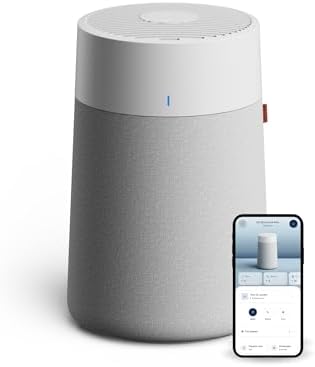
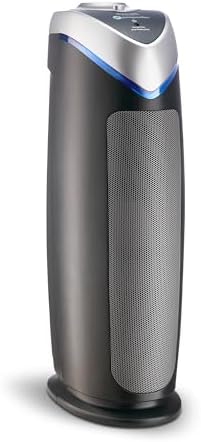
Top Picks: Compact Purifiers for Desks and Small Rooms
Six compact models that suit small spaces. Some are larger than true desktop units, so check each listing for size and rated room size.




What a Desktop Purifier Can Do
A desktop purifier draws air through a small filter and releases it near you. This can lower dust and some particles in your immediate area, especially if you sit close to the unit.
Its effect on the rest of the room is small, since the airflow is low.
Desktop vs Room Purifier
| Factor | Desktop | Room purifier |
|---|---|---|
| Coverage | Personal bubble | Whole room |
| Airflow | Low | Higher |
| Noise | Small fan, can be audible | Quieter at low speed for same airflow |
| Space | Fits on a desk | Needs floor space |
| Cost | Lower | Higher |
Choosing a Desktop Unit
- A true HEPA-type filter, not just a screen
- A quiet low setting, since you sit next to it
- Power source that suits your desk
- Easy filter replacement
- No ozone
Noise at Close Range
You will sit very close to the unit, so noise matters more than for a floor purifier. Check the lowest setting noise and read reviews for whine or rattle.
Placement on a Desk
Put it within an arm\u2019s length, with clear airflow, not blocked by monitors or papers. Do not place it where air blows straight in your face if that bothers you.
Keep the intake away from paper and cables.
Offices and Shared Spaces
Check workplace rules before bringing a purifier. Some offices restrict personal appliances.
For a shared open office, a desktop unit helps only the person at the desk.
Filters and Running Costs
Small filters cost less but wear out faster. Check replacement price and schedule, and keep a spare.
When to Choose a Room Purifier Instead
If the room is small and closed, such as a home office, a compact room purifier cleans more air and may be a better buy. Our guide to portable purifiers explains the options.
Who Actually Benefits From a Desktop Purifier
The people who get the most from a desktop unit are those who spend long hours at one spot: a remote worker in a spare bedroom, a student in a dorm, someone in a cubicle or a nurse station in a quiet area. In those cases the unit sits close to the breathing zone, so even a small airflow can reduce what reaches you.
It is less useful in a large, open office or a shared meeting room. There, air mixes constantly and a small unit cannot move enough of it to make a difference. Be realistic about the space and the job you want the purifier to do.
Reading the Specifications Honestly
| Spec | What it tells you | What to watch for |
|---|---|---|
| CADR | Clean air delivery rate | Small desktop units are often low, so check the number |
| Coverage area | Room size the maker lists | May assume a long time to clean the air |
| Filter type | HEPA or HEPA-type | Look for true HEPA wording |
| Noise at low | How loud on the lowest speed | Use at arm’s length, so this matters |
| Power | Plug or USB | USB units can be weaker |
| Filter life | Replacement interval | Often shorter on small filters |
Treat marketing coverage claims with caution. A tiny unit that claims to clean a large office is not realistic. Use CADR and the maker’s fine print.
How Close to You Should It Sit?
Close placement improves the chance that cleaned air reaches you, but too close can create a draft and noise that bother you. A common arrangement is to place the unit on the desk beside your monitor or on a nearby shelf, with a clear gap on the intake side and the exhaust pointing slightly away from your face.
Avoid placing it against a wall, behind a monitor or under papers. Blocked intakes reduce performance and make the fan louder.
Sizing a Personal Space
AHAM’s guideline of a CADR near two-thirds of the floor area applies to full rooms. A cubicle of 64 square feet would need a CADR of roughly 43 for a full air change rate, but in practice open cubicles share air with a larger space, so a desktop unit offers a local benefit more than a full room cleaning.
For a closed 100 square foot home office, a small unit with a CADR in the range of 60 to 100 is a reasonable match. For anything larger, move to a floor unit.
Filters, Carbon and Odors
Most desktop units use a small HEPA-type filter, sometimes with a thin carbon layer. A thin sheet will do little for strong odors such as cooking smells. If odors are your main concern, look for a unit with more carbon or choose a larger purifier.
Small filters load faster, so check how often the maker suggests replacement and what a new filter costs.
Using a Desktop Purifier Day to Day
- Run it on the lowest setting that keeps you comfortable
- Keep the intake clear of paper, cables and monitors
- Wipe dust off the housing and vents regularly
- Check the filter on a schedule rather than waiting for a smell
- Use a separate monitor if you want to see how air quality changes
Common Mistakes
- Expecting a desktop unit to clean a whole office
- Placing it where it blows papers or dries your eyes
- Ignoring noise until it distracts you
- Buying a unit with an ionizer or ozone mode
- Forgetting to buy spare filters
Alternatives to Consider
If you want better room coverage, a quiet floor-standing HEPA purifier sized for the room is a better answer. If you only need less dust on your desk, a damp cloth and a HEPA vacuum do much of the work. If your workplace has poor ventilation, report it to facilities, because filtering a single desk cannot replace fresh air.
How to Choose
- Decide whether you want a personal or room-size effect.
- Choose a true HEPA-type filter.
- Check close-range noise.
- Check size and power source.
- Compare filter costs.
- Place it within arm\u2019s reach.
Do
- Match the unit’s rated coverage to your room first
- Run it consistently, not only when the air feels bad
- Leave space around the unit for airflow
- Replace filters on the maker’s schedule
Don’t
- Do not buy on looks or price alone
- Do not block the intake or exhaust
- Do not skip filter changes
- Do not expect a purifier to fix every source of pollution
Honest Limits
- This guide uses manufacturer information and public guidance from the EPA and AHAM, not our own lab tests.
- Features and room ratings change between model years, so confirm on the listing before you buy.
- A purifier is not a medical device and does not replace medical advice or treatment.
Who Should Skip This
Skip a desktop purifier if you need to clean an entire room, if your goal is odor control for a kitchen or break room, or if your office has serious ventilation problems. Those need a larger unit or building-level fixes.
Skip units with ionizer or ozone options you cannot turn off.
When to See a Professional
If you have symptoms at work that seem tied to the building, such as headaches, irritation or breathing trouble, talk to a doctor and raise it with facilities or an occupational health professional.
This page is general information, not medical or workplace safety advice.
Frequently Asked Questions
Do desktop air purifiers work?
They can reduce particles near you, but their small airflow means the benefit is local. They suit a small space or a personal zone. For a whole room, a floor-standing HEPA purifier sized by CADR is the better choice.
How close should a desktop purifier be to me?
Close enough that cleaned air reaches you, but not so close that the draft or noise bothers you. A spot on the desk beside the monitor or on a nearby shelf, with clear intake and an exhaust pointing slightly away from your face, works well.
Are desktop purifiers quiet?
Many are quiet on the lowest setting, but noise matters at arm’s length. Check the maker’s low-speed noise figure and read reviews. Some small fans have a whine that you notice more at close range.
What filter should a desktop purifier have?
A true HEPA filter is the best option for fine particles, often with a thin carbon layer for light odors. Check the listing carefully, because many small units use HEPA-type filters, which capture less than true HEPA.
Can a desktop purifier clean my whole office?
Not usually. Small units move little air, so they work best in a cubicle or small room. For larger spaces, you need a unit with a higher CADR or several units, plus good building ventilation.
Do USB-powered purifiers perform well?
They can be convenient, but USB power limits the fan, so airflow is often modest. Check CADR and noise. A plug-in model usually moves more air than a USB one of similar size.
How often should I change the filter?
Follow the maker’s guidance, which is often every three to six months for small filters, depending on use. Dusty or smoky spaces need more frequent changes. A loaded filter reduces airflow and increases noise.
Are ionizers safe in an office?
The EPA advises against ozone-generating air cleaners, and some ionizers produce ozone as a by-product. Choose a filter-based unit and turn off any ionizer mode if you can.
Will a desktop purifier help with allergies?
It may reduce airborne particles around you, but it is not a treatment. For allergy care, talk to your doctor. A larger purifier in your bedroom often has more effect on overall exposure.
What should I do about poor ventilation at work?
Report it to facilities or your employer. Good ventilation and filtration at the building level matter more than a desk unit, and EPA guidance covers how workplaces can improve indoor air.
Bottom Line
A desktop purifier is a small convenience for a personal bubble. For a whole room, choose a compact room purifier instead.
Check the filter type, noise and size before buying.
Related reading: port,fan,sens
Sources: EPA, Guide to Air Cleaners in the Home; AHAM Verifide.