Last updated:
Disclosure: As an Amazon Associate we earn from qualifying purchases. This does not change what we recommend. See our affiliate disclaimer.
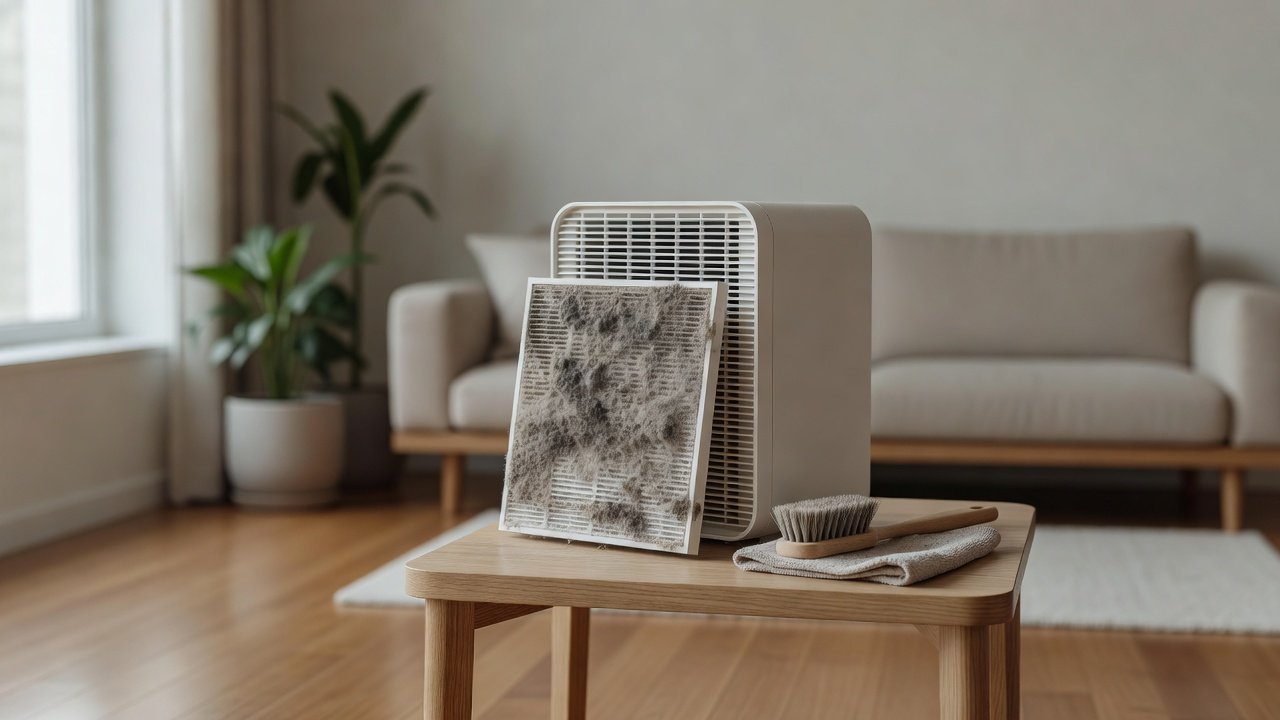
Stubborn dust is the grey felt that builds up on vents, grilles and housings when cleaning has been skipped for months. It can be matted with pet hair, lint and a little grease. The trick is to loosen it gradually, vacuum it away and wipe the surface, rather than scrubbing or flooding it with liquid.
We have not tested these products ourselves, so follow your manual. Unplug the unit before cleaning, keep liquids away from the electronics and do not push tools into the fan area.
Best tools
- Soft brush and vacuum
- Microfiber cloth
- Cotton swabs
Avoid
- Compressed air at HEPA
- Spraying liquids into vents
- Sharp tools in the grille
Key Takeaways
- Loosen dust gradually, then vacuum on low suction
- Wipe with a microfiber or barely damp cloth
- Never spray liquids into vents or use compressed air on HEPA
- Set a weekly and monthly routine to prevent buildup
A Step-by-Step Deep Clean
Set aside twenty minutes. Unplug and move the unit. Remove filters, brush loose dust from the grille and vents, then vacuum with a soft brush attachment. Wipe the housing with a microfiber cloth and, for film, a barely damp soapy cloth followed by a clean damp cloth. Clean the pre-filter. Inspect the main filter and replace it if needed. Let everything dry, reassemble and run the unit. Write the date in your log and set a reminder for the next check.
How Dust Affects Airflow and Noise
A dust-coated grille and loaded pre-filter restrict airflow, so the fan spins faster and louder. Over time this can shorten filter life and strain the motor. Cleaning often returns noise to a normal level and restores airflow. If the unit stays noisy after cleaning, check the fan area for debris and the filter seating, and contact support if needed.
Dust Sources You Can Control
Common sources include old carpets, dusty bedding, pets, open windows, construction and cluttered surfaces. Vacuum with a good filter, wash bedding weekly, keep pets off beds and reduce clutter. Keep windows closed during high-dust or pollen periods. Fewer sources mean less dust in the air and less on the unit.
Choosing a Unit Easier to Clean
Smooth housings, removable grilles and washable pre-filters make deep cleaning less of a chore. Check reviews for comments about dust and maintenance effort. If your home is very dusty, choose a unit with a sufficient CADR and a pre-filter that catches most of the load.
Safety Reminders While Cleaning
Always unplug the unit, keep liquids away from electronics and do not run the unit with the cover off. Wear gloves if you are cleaning mold or heavy debris. Dispose of dust properly. If you find damage to the cord or housing, stop using the unit.
When to Call Support
If you cannot remove dust from the fan area, the fan wobbles, there is an unusual noise or smell, or the unit overheats, contact the manufacturer. Do not open sealed parts. Have the model number and a photo ready.
Cost of Skipping Maintenance
Neglected units run louder, filter life is shorter and the unit may fail earlier. A few minutes each month costs little and protects your investment. Replacement filters are an ongoing cost, so protecting them with a clean pre-filter is good value.
Quick Routine to Keep It Clean
Weekly: dry-dust the exterior. Monthly: vacuum vents, check the pre-filter and wipe the housing. Every few months: inspect the main filter and fan area. Seasonally: review your schedule and replace filters. Keep notes so the routine stays easy.
Checking Your Progress After Cleaning
After a deep clean, run the unit and check airflow with your hand at the outlet, listen for noise and look at the display or indicator. Compare with how it behaved before. If airflow feels stronger and quieter, the dust was the problem. If not, check the filter and the fan area. Note the result in your log so you can see how fast dust returns and adjust the schedule.
What Not to Do With Stubborn Dust
Do not use a pressure washer, a wet scrub brush or a steam cleaner on the housing. Do not use compressed air on HEPA filters or into the fan housing, which can drive dust deeper and damage media. Do not scrape with metal tools, which scratch plastic and can contact live parts. Do not use abrasive powders that scratch. Slow, dry, gentle work gets better results and keeps the unit safe.
Air Purifiers That Are Easy to Keep Dust-Free
These picks come from the Hostinger affiliate plugin. Specs change by model year, so confirm filter type, CADR and replacement costs on the product page before you buy.






Why Dust Becomes Stubborn
Dust that stays on a surface absorbs humidity, mixes with oils and hair and forms a mat. Static electricity makes it cling to plastic. In vents and grilles, it also collects in corners where cloths do not reach. The longer it sits, the more work it takes.
Prepare the Unit and the Area
Unplug the unit and move it to a protected area, preferably outdoors or on a sheet. Wear a mask if you are sensitive to dust. Open the cover and remove the filters as the manual describes. Keep the vacuum nearby with a soft brush attachment.
Loosen Before You Remove
Use a soft brush or a dry paintbrush to loosen dust from corners and slots, brushing toward the vacuum nozzle. Work gradually in one direction. For matted lint, use a lint roller or a damp rubber glove to lift it. Do not scrape with sharp tools, which can scratch plastic.
Vacuum, Then Wipe
Vacuum the loosened dust with a soft brush attachment on low suction. Then wipe with a microfiber cloth. For sticky film, use a barely damp cloth with a drop of mild dish soap, then a clean damp cloth and dry. Keep liquid away from vents, controls and seams.
Deal With the Filters
A heavily dusty housing often means loaded filters. Vacuum a washable pre-filter, clean it as the manual allows and replace the main filter if it is loaded or past its schedule. Do not wash HEPA or carbon filters or use compressed air on them.
Tools for Tight Corners
Cotton swabs, a soft toothbrush, a dry paintbrush and a vacuum crevice tool with a brush reach tight corners. Use light pressure and avoid bending slats. Do not insert anything deep toward the fan.
Pet Hair and Lint Mats
Pet hair can weave into dust, making a felt. A lint roller, damp rubber glove or masking tape lifts hair well. Follow with a vacuum. Brush pets away from the unit and clean more often in shedding seasons.
Sticky or Greasy Dust
Dust near kitchens can be sticky. A drop of dish soap on a barely damp cloth cuts grease. Wipe, rinse with a clean damp cloth and dry. Do not spray cleaners. Move the unit away from the stove where possible.
Preventing Buildup
A weekly dry dusting and monthly vacuum of vents keep dust from caking. Place the unit with clearance and away from heavy dust sources. Clean floors and use door mats. Keep a log or reminder.
When Dust Signals Another Problem
Fast, heavy dust may mean the unit is too small, the filters are loaded or the home has a dust source such as renovation or an old duct. Check filter condition, room size and sources. Replace filters on schedule.
How to Choose
- Look for removable grilles
- Check for a washable pre-filter
- Compare replacement filter costs
- Match the CADR to the room
Do
- Match the unit’s rated coverage to your room first
- Run it consistently, not only when the air feels bad
- Leave space around the unit for airflow
- Replace filters on the maker’s schedule
Don’t
- Do not buy on looks or price alone
- Do not block the intake or exhaust
- Do not skip filter changes
- Do not expect a purifier to fix every source of pollution
Honest Limits
- This guide uses manufacturer information and public guidance from the EPA and AHAM, not our own lab tests.
- Features and room ratings change between model years, so confirm on the listing before you buy.
- A purifier is not a medical device and does not replace medical advice or treatment.
Who Should Skip This
When to See a Professional
Frequently Asked Questions
Can I use compressed air?
Avoid compressed air on HEPA filters and into electronics.
What if dust is sticky?
Use a drop of mild soap on a barely damp cloth, then rinse with a clean damp cloth.
How often should I clean?
Dust weekly and vacuum vents monthly.
Why does dust return so fast?
The unit may be undersized, filters loaded or there is a dust source nearby.
Bottom Line
To clean stubborn dust from an air purifier, loosen it with a soft brush, vacuum on low suction and wipe with a microfiber or barely damp cloth, keeping liquid away from vents and electronics. Replace loaded HEPA and carbon filters rather than washing them, and set a regular routine so dust does not build up again.
Related reading: sens,fan,bed
Sources: EPA, Guide to Air Cleaners in the Home; AHAM Verifide.